TradPlus Adapter Integration
Overview
The Nexverse TradPlus Mediation Adapter allows publishers to serve Nexverse ads through TradPlus mediation.
When integrated, TradPlus includes Nexverse as a custom event ad source in its mediation waterfall. TradPlus requests ads from Nexverse whenever the waterfall reaches the Nexverse position.
Supported ad formats:
- Banner
- Interstitial
- Rewarded
- Native
How TradPlus Custom Networks Work
In TradPlus, a custom SDK network is a mediation network that you register manually in the TradPlus dashboard by providing the adapter class names for Android and iOS. After the custom network is created, you enable it inside the relevant ad unit waterfall and pass the required server parameters to the adapter.
For the Nexverse TradPlus adapter:
- Placement ID is passed from the TradPlus ad unit mapping as the Third-Party Ad Placement ID
- accountId, appId and placementId are passed through TP Parameters
Prerequisites
Before integrating the Nexverse TradPlus adapter, ensure the following:
- Your app is integrated with the TradPlus SDK
- You have a Nexverse Publisher Account
- You have obtained the following from the Nexverse dashboard:
- Account ID
- App ID
- Placement ID
If you have not created your Nexverse app and placement yet, complete Nexverse onboarding first: App Onboarding
Android Integration
Step 1: Integrate the TradPlus SDK
Integrate the TradPlus Android SDK in your app first. Follow the official TradPlus integration for the latest SDK requirements and supported setup.
Step 2: Add the Nexverse Android Adapter
Add the Nexverse TradPlus adapter to your Android app.
Include Maven in your top-level build.gradle file -
Add Dependencies
Core SDK Dependency
- Add the following dependency in your module’s
build.gradlefile,dependenciessection:
Optional Dependencies
Depending on the Ad formats you want to support, you may need to add additional dependencies.
Video Banner Ads:
If you want to support video Ads on Media3 or Exo player, you will need to add one of the following dependencies:
Media3 Dependency:
ExoPlayer Dependency:
Choose either Media3 or ExoPlayer based on your app’s requirements. Both libraries are not needed simultaneously.
If you are not using these libraries, our SDK will utilize Android’s native media view.
Add Permissions
Add the required permissions in your AndroidManifest.xml file:
  <!-- Required permissions -->
<uses-permission android:name="android.permission.INTERNET"/>
<uses-permission android:name="android.permission.ACCESS_NETWORK_STATE"/>
Step 3: Sync Gradle
After updating dependencies:
- Click Sync Now in Android Studio
- Ensure the project builds successfully
Step 4: Inititialize the SDK (Recommended)
The SDK must be initialized before requesting any ads. This is a one-time process that sets up the SDK with your account configuration and prepares it for ad delivery.
You can initialize the SDK from an Activity, Fragment, or Application class. However, we strongly recommend initializing it in the Application class’s onCreate() method so that it is ready as early as possible in the app lifecycle.
To ensure optimal performance, initialize the Nexverse SDK at app startup, ideally alongside TradPlus. Early initialization helps avoid delays when the adapter is triggered for ad requests.
Since SDK initialization may take some time, delaying initialization can result in the first ad request returning no ad.
The TradPlus adapter exposes only a loadCustomAd() method, so SDK initialization may need to occur within this method if not done earlier. Because initialization is not instantaneous, the first ad request may not return an ad. TradPlus mediation does not require a separate explicit initialization call..
Create the initialization configuration:
SDK Initialization Parameters
| Parameter | Usage |
|---|---|
appContext |
Application/activity/fragment context to initialize SDK |
accountId |
Account Id shared by the Nextverse team. |
appId |
App Id shared by the Nextverse team. |
videoPlayerProviderClass |
VideoPlayerViewImpl::class.java if using exo or media3 extension, otherwise leave empty. |
Initialize the SDK:
SDK should be initialized from main thread only.
If initialization and Ad request are triggered from the same class then ensure the Ad request call is made inside
onInitializationComplete only when the result matches InitializationStatus.SUCCEEDED or InitializationStatus.SERVER_STATUS_WARNING.TradPlus Console Configuration
Step 1: Create a Custom Network
-
Open the TradPlus console
-
Navigate to: Adv. Settings → Custom Network
-
Select Add Network
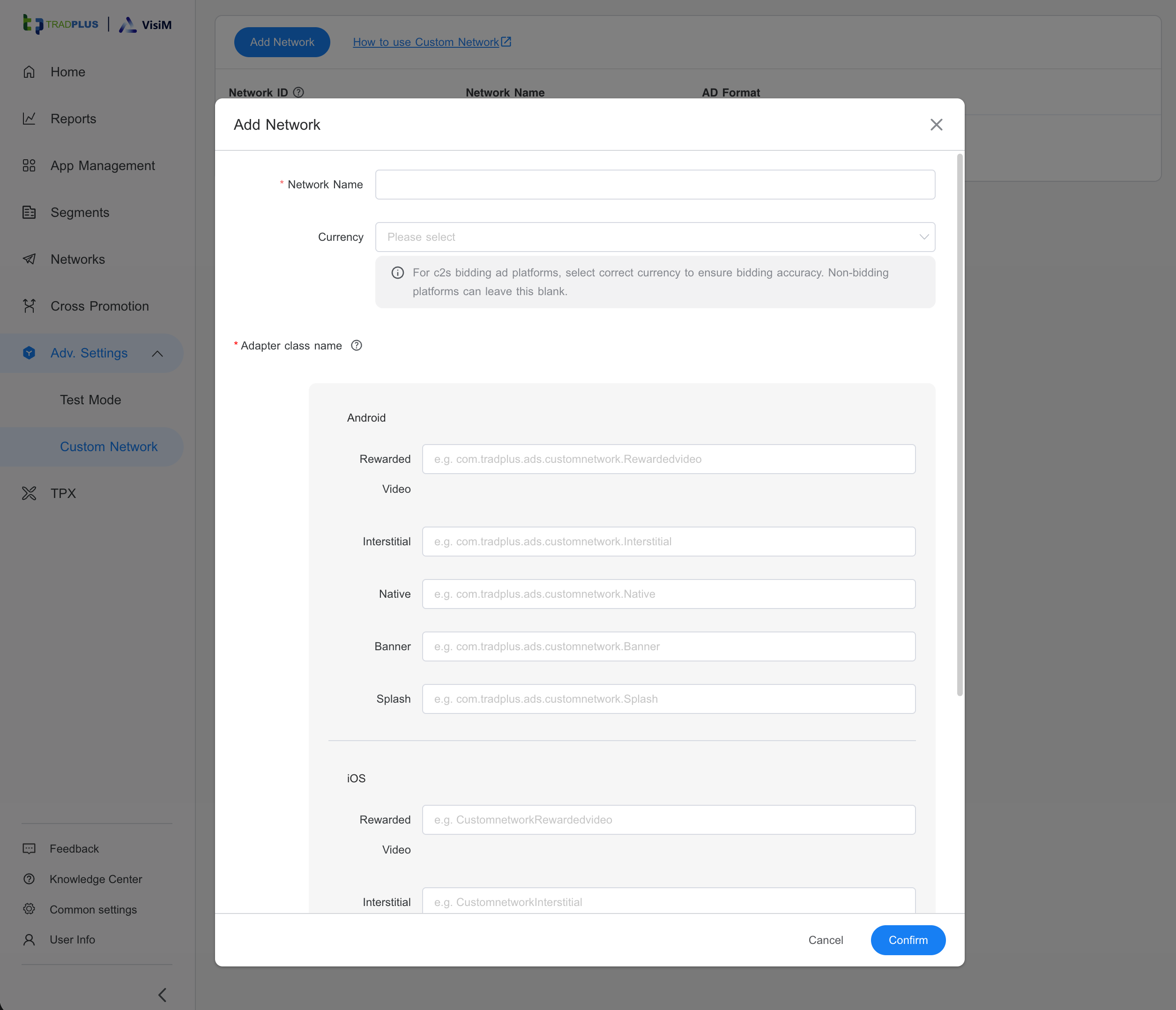
Mapping Class Name
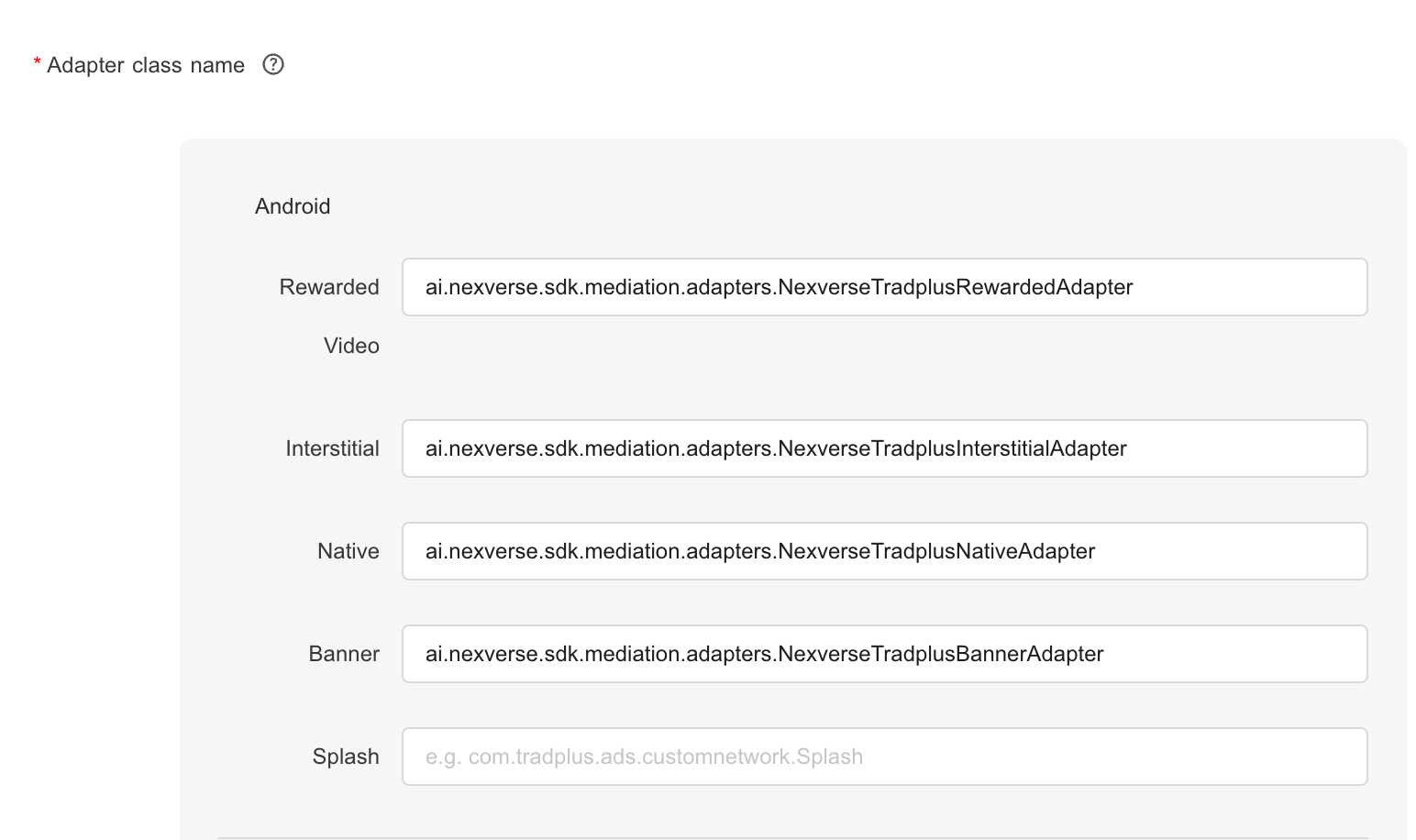
Android
You need copy the respective class to Nexverse custom network.
Step 2: Add Ad Units
- Open the newly add app in App Management
- Click Add ad units > Add Single Unit
- Select your ad format
- Type the Ad Unit name
- Click Confirm
Step 3: Configure Ad Unit Mapping
Enable Nexverse ad network for ad unit:
Expand the ad unit → Activate Ad Source → Add Single Ad Source
Step 4: Adapter Parameters
Add the following JSON configuration in the Parameter field.
Interstitial Ad
| Parameter | Type | Required | Description |
|---|---|---|---|
| account_id | String | Yes | Nexverse publisher account ID |
| app_id | String | Yes | Nexverse app ID |
| placement_id | String | Yes | Nexverse placement ID |
| adType | String | No | One of “all”,“html” or “video”, default is “all” |
Rewarded Ad
  {
    "accountId”:”<account_id>“,
    ”appId”:”<your_app_id>”,
    ”placementId":"<your_placement_id>"
}
| Parameter | Type | Required | Description |
|---|---|---|---|
| account_id | String | Yes | Nexverse publisher account ID |
| app_id | String | Yes | Nexverse app ID |
| placement_id | String | Yes | Nexverse placement ID |
Banner Ad
  {
    "accountId”:”<account_id>“,
    ”appId”:”<your_app_id>”,
    ”placementId":"<your_placement_id>",
    ”width":"300",
    "height":"250"
}
| Parameter | Type | Required | Description |
|---|---|---|---|
| account_id | String | Yes | Nexverse publisher account ID |
| app_id | String | Yes | Nexverse app ID |
| placement_id | String | Yes | Nexverse placement ID |
| width | int | No | Banner ad width |
| height | int | No | Banner ad Height |
The following table lists the standard banner sizes. You should replace the width and height in json with one of the following:
| Size in dp (WxH) | Description | Availability | Supported Type |
|---|---|---|---|
| 300x50 | Banner | Phones and tablets | Banner |
| 320x50 | Banner | Phones and tablets | Banner |
| 320x100 | Large banner. | Phones and tablets | Banner |
| 300x250 | IAB medium rectangle | Phones and tablets | Banner, Video |
| 468x60 | IAB full-size banner | Tablets | Banner |
| 728x90 | IAB leaderboard | Tablets | Banner |
Native Ad
  {
  "accountId": "<account_id>",
  "appId": "<app_id>",
  "placementId": "<placement_id>",
  "context_type": "1",
  "context_sub_type": "10",
  "placement_type": "1",
  "title_required": "true",
  "title_length": "90",
  "icon_required": "true",
  "icon_min_width": "50",
  "icon_min_height": "50",
  "image_required": "true",
  "image_min_width": "150",
  "image_min_height": "150",
  "sponsored_required": "false",
  "sponsored_length": "90",
  "desc_required": "true",
  "cta_required": "true"
}
| Parameter | Type | Required | Description |
|---|---|---|---|
| account_id | String | Yes | Nexverse publisher account ID |
| app_id | String | Yes | Nexverse app ID |
| placement_id | String | Yes | Nexverse placement ID |
| context_type | int | Recommended | Context Type, see table below |
| context_sub_type | int | No | Context sub-type, see table below |
| placement_type | int | Recommended | Placement Type, see table below |
| title_required | boolean | Recommended | true or false |
| title_length | int | Yes | Maximum length of the text in the title element. Recommended to be 25, 90, or 140 |
| icon_required | boolean | No | Icon image |
| icon_min_width | int | No | Icon minium width, max width: at least 50, aspect ratio: 1:1 |
| icon_min_height | int | No | Icon minium height, max height: at least 50, aspect ratio: 1:1 |
| image_required | boolean | No | Main Image, true or false |
| image_min_width | int | No | At least one of 2 size variants required: Small Variant: max width: at least 200, 267, or 382 aspect ratio: 1:1, 4:3, or 1.91:1. Large Variant: max width: at least 627, 836, or 1198 aspect ratio: 1:1, 4:3, or 1.91:1 |
| image_min_height | int | No | At least one of 2 size variants required: Small Variant: max height: at least 200 aspect ratio: 1:1, 4:3, or 1.91:1. Large Variant: max height: at least 627 aspect ratio: 1:1, 4:3, or 1.91:1 |
| sponsored_required | boolean | No | Sponsored by text required, true or false |
| sponsored_length | int | No | Sponsored length, Max 25 or longer |
| desc_required | boolean | No | true or false. Descriptive text associated with the product or service being advertised. Longer length of text in response may be truncated or ellipsed by the Nexverse ad servers. |
| cta_required | boolean | Yes | descriptive text describing a ‘call to action’ button for the destination URL. true or false |
Context Type
The following table lists the Context types.
| Type | Description |
|---|---|
| 1 | Content-centric context such as newsfeed, article, image gallery, video gallery, or similar. |
| 2 | Social-centric context such as social network feed, email, chat, or similar. |
| 3 | Product context such as product listings, details, recommendations,reviews, or similar. |
Context Sub Type
The following table lists the Context sub types.
| Type | Description |
|---|---|
| 10 | General or mixed content. |
| 11 | Primarily article content (which of course could include images, etc as part of the article) |
| 12 | Primarily video content |
| 13 | Primarily audio content |
| 14 | Primarily image content |
| 15 | User-generated content - forums, comments, etc |
| 20 | General social content such as a general social network |
| 21 | Primarily email content |
| 22 | Primarily chat/IM content |
| 30 | Content focused on selling products, whether digital or physical |
| 31 | Application store/marketplace |
| 32 | Product reviews site primarily (which may sell product secondarily) |
Placement Type
The following table lists the Placment types.
| Type | Description |
|---|---|
| 1 | In the feed of content - for example as an item inside the organic feed/grid/listing/carousel. |
| 2 | In the atomic unit of the content - IE in the article page or single image page. |
| 3 | Outside the core content - for example in the ads section on the right rail, as a banner-style placement near the content, etc. |
| 4 | Recommendation widget, most commonly presented below the article content. |
App Content (Optional)
You can set up IAB OpenRTB 3.2.16 Object: Content, using below functions. This object describes the content in which the impression will appear, which may be syndicated or non- syndicated content. This object may be useful when syndicated content contains impressions and does not necessarily match the publisher’s general content. The exchange might or might not have knowledge of the page where the content is running, because of the syndication method. For example, might be a video impression embedded in an iframe on an unknown web property or device.
Create an instance of ContentObject class.
Pass the ContentObejct instance to SDK.
SDK will use the same for all the ad calls.
User Details (Optional)
You can set up IAB OpenRTB 3.2.20 Object: User, using the below function. This object contains information known or derived about the human user of the device (i.e., the audience for advertising). The user id is an exchange artifact and may be subject to rotation or other privacy policies. However, when present, this user ID should be stable long enough to serve reasonably as the basis for frequency capping and retargeting.
Troubleshooting
Dependency Resolution Failed
- Verify internet connectivity
- Ensure Gradle sync completed
- Confirm correct SDK version
Adapter Not Loaded
- Verify the adapter class name.
- Verify the parameter json.
Ads Not Serving
Verify:
- Correct account_id
- Correct app_id
- Correct placement_id
- Nexverse network is linked to the ad unit
- eCPM value is not too low
Support
For integration assistance:
Email
support@nexverse.ai
Support Portal
https://nexverse.ai